Kick-Off · Staff Training
The kick-off walkthrough.
Present it live, hand it over as a PDF.
Eight stations, in order: what's in it for the patient, the live demo, a real Bipolar Type 1 case, the objections, the clinical proof, the dashboard, and the first patient. Tick each as you go, then download the leave-behind.
8
Stations
~1,000
Patients deployed
30
Clinics
r=0.89
MADRS correlation
Who you're meeting today
Your Emobot team
Two people, one job: get your clinic to its first patient data fast, and keep it there.

Tanel Petelot
CEO & Co-founder
Leads Emobot's commercial strategy. Your point of contact for the partnership, pricing, and anything strategic.

Fatima Bouzaiene
Care Success
Owns your onboarding and ongoing success: patient enrolment, staff training, check-ins, and your monthly reviews. Your day-to-day contact.
Before you start
Set the room
Fill this in and it prints onto the leave-behind PDF at the end. All optional, all local to this screen.
What's in it for the patient
Emobot gives patients a simple way to see their own mood, sleep, and activity between visits, and gives the clinic the signal it was missing.
The vision
Finally, mental health
you can actually see.
A world where no one slips through the cracks between visits. Where care doesn't stop at the clinic door. That's what your patients are joining, and it lives quietly in their pocket.
Embed not loading? Open the patient video ↗
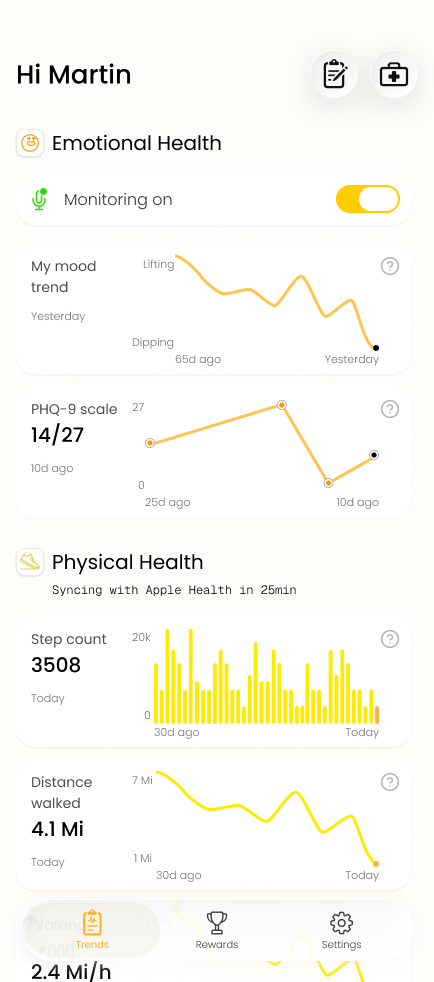
What the patient sees in the app
.png&w=384&q=75)
.png&w=384&q=75)
.png&w=384&q=75)
- It's built for patients, not surveillance: they finally get to see their own mood, sleep, and activity patterns over time.
- It's a mood self-monitoring app patients actually want: install once in 3 minutes, then nothing. No daily surveys, no homework.
- In the app: an optional quick mood check-in, plus passive trends that build automatically in the background.
- Privacy up front: facial analysis runs on the phone, voice is processed then discarded. Only numerical scores leave the device.
- The win-win: the patient gets self-awareness and feels cared for between visits; the clinic gets the signal it was missing.
Live demo
The AI reads affect in real time, the same engine that runs passively on the patient's phone.
Launch the live demo
Watch the AI map your emotion in real time. Opens in a new tab so the camera works. Log in with demo / demo and switch the toggle bottom-right from FR to EN.
- As the camera runs, the valence/arousal map fills in, each dot a reading of emotional state.
- The density view shows how a mood state builds up over a session.
- This is the same engine running passively on the patient's phone, no acting required.
- This browser demo streams live; on the phone, the facial model runs fully on-device.
Bipolar Type 1 case
A real longitudinal trace through a manic-to-depressive transition, the clearest picture of what Emobot catches.
Embed not loading? Open the Bipolar Type 1 case ↗
- Left to right: euthymic, manic episode, phase transition, depressive episode.
- The score line drops while the patient was still between appointments, fully passive.
- Early depressive symptoms show at the transition, days before a scheduled visit would catch them.
- This is the 48-hour early signal, captured in a real longitudinal trace.
The usual objections
The questions clinicians ask most, answered: privacy, battery, and patient acceptance.
- Privacy / HIPAA: AI runs on the device. Raw facial data and audio never leave the phone, only anonymized numerical output is sent, like a lab result, not the blood sample.
- Battery: ~5% desktop, 7-10% mobile, less than most navigation apps. Battery is a core engineering KPI, down 30% this past year.
- Patient acceptance: completely passive, 75% activation when the doctor recommends it, versus 30-40% for PHQ-9 by email.
- EHR: no integration required. Standalone web dashboard, patient data kept separate to simplify compliance.
Clinical results
The proof behind the platform: correlations, studies, and academic partners.
- MADRS r=0.89 against the clinical gold standard, PHQ-9 r=0.83 against self-report.
- 10+ clinical studies across France, the US, and Canada.
- Academic partners: Yale, Harvard Medical School, Johns Hopkins, UCSD, McGill, Charite Berlin, GHU Paris.
- FDA TEMPO De Novo filed January 2026. Four patents.
Scale & traction
This is deployed across real interventional practices, not theoretical.




- "It's rolled out across roughly 1,000 patients in 30 clinics."
- Trusted by leading interventional groups: Hope Therapeutics (NRx, Nasdaq: NRXP), Radial Health, Thrive Mind Psychiatry, and Nurify Medical in the UK.
- 150+ physicians across the US, France, Germany, and Canada.
The dashboard
The dashboard you'll check every day, and exactly what it shows.
Embed not loading? Open the dashboard demo full-screen ↗
- The 30-day wellness trend is the one view you'll check most.
- Early response, plateau, and deterioration patterns are visible at a glance.
- Anonymized by design: you see a score and a trend, not recordings.
- When a trend is interesting, screenshot it and send it to your CSM with one line, it builds your reviews and outcomes story.
Add your first patient
The one action that matters most: enrolling your first patient.
- Log in at portal.emobothealth.com and click "Add a patient".
- Enter name + email, click Add. The invitation email goes out automatically.
- Patient completes the 3-minute setup, then does nothing. You start seeing data within days.
After the kick-off
Your team's reference
Everything the staff needs to enroll patients on their own. All of this prints into the leave-behind PDF.
The 50-second introduction script
Achieves 75% patient activation. Doctor or NP delivers, word for word.
Opening · 10 sec
"Before you leave today, I want to show you something we're now using with all our [TMS / Spravato] patients."
What it is · 20 sec
"It's an app called Emobot. It runs quietly in the background; you don't have to do anything. It picks up subtle mood and behaviour patterns that tell me if you're stable, improving, or if we should check in sooner."
Privacy bridge · 10 sec
"It runs passively. Facial analysis happens on your device, so raw video never leaves the phone. Voice is held only briefly then discarded. I see only an anonymised summary, and only if you choose to share it."
The ask · 10 sec
"Would you be willing to try it? Setup takes 3 minutes. I'll show you the QR code now."
Patient objections: quick answers
Does it watch me?
Facial analysis runs on-device; raw video never leaves the phone. Voice sits in a short processing window, then is discarded.
Who sees my data?
Only if you share in-app. The doctor sees an anonymized summary, and the share period ends when you choose.
Battery drain?
~7% per day, comparable to maps apps.
Can I turn it off?
Yes. Pause Monitoring on the home screen. No need to notify anyone.
What do I have to do?
Download, 3-min setup, turn on monitoring. Then use your phone normally.
Key product facts
Battery
~5% desktop, 7-10% mobile
Primary device
iPhone (iOS 16+)
Activation
Via email invitation
Pause
Home-screen button, no notice needed
Privacy
Facial on-device; voice ephemeral, then discarded
Timing
Enroll 3-10 days before course start
Week-1 troubleshooting
App not running in background
iOS: Settings → Emobot → Background App Refresh ON
Patient didn't complete setup
Nurse/NP calls within 48h: "It takes 3 minutes, can we do it together now?"
Data gap (>72h)
Check the dashboard, contact the patient, escalate to support@emobothealth.com
Dashboard confusion
Re-watch the patient video or book a 15-min screen-share with your CSM
What happens next
Your success cadence with your CSM. Book the dates now; they keep everyone accountable.
Be part of it
Don't pick and choose. Enroll every patient.
The clinics seeing the biggest wins are the ones that made Emobot the default for every TMS and Spravato patient, not a select few. The more patients you enroll, the sharper the signal, the earlier you catch deterioration, and the stronger your outcomes story.
You're joining roughly 1,000 patients across 30 clinics and a network of leading interventional groups. Let's get your whole panel on board, starting today.
Leave them with the takeaway
The full walkthrough, objection answers, clinical evidence, and how to enroll the first patient, in one branded PDF.